
Start TikTok's official authorization from “Connections & authorization” in Settings. Once the store owner approves on TikTok's page, the store appears in your list automatically.
Before you start
- Have the store owner's account ready. The owner has to sign in on TikTok's page and approve.
- Admins and members can both connect stores, and an admin can turn this off for an individual member. If you do not have permission, choose “Ask an admin” to copy the page link and send it to an admin.
Step 1: Start the authorization
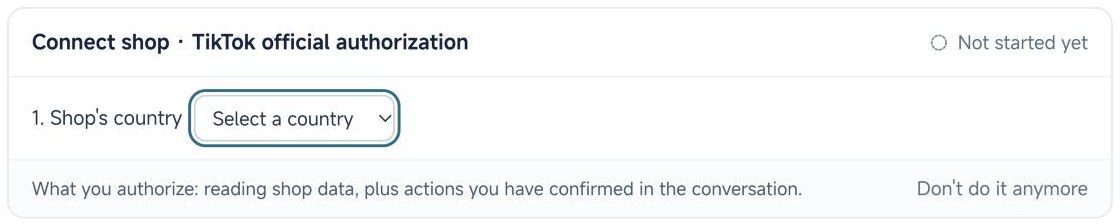
Open Settings, go to “Connections & authorization”, and under Stores choose to connect a store with TikTok official authorization.
Select the store's country and the store type: local or cross-border. The country here is the country you sell in.
Step 2: Approve on TikTok's page
There are two ways. Use either one:
- Open it directly: Auroviagent opens TikTok's authorization page in a new tab. Sign in with the store owner's account and click Authorize.
- Copy the authorization link: if the store is signed in on a different browser, such as a dedicated store browser, copy the link and paste it there to approve. The link is valid for 10 minutes, and you can generate a new one after it expires.
Step 3: Return to Auroviagent
After approving, come back to Auroviagent. The store appears in the store list automatically, with nothing to add by hand. One authorization by a store owner's account brings in all the stores under that account.
Auroviagent then reads orders, products, samples, partnerships, finance and logistics data, within the permissions TikTok actually granted, and keeps it up to date.
Choosing a region for a US cross-border store
In Auroviagent, select United States as the country and cross-border as the store type. On TikTok, choose according to where the seller is registered. Cross-border sellers registered in mainland China or Hong Kong select “Chinese mainland and the Hong Kong SAR (Cross-Border only)”.
Ads authorization and other connections
- TikTok Ads is authorized separately. It is required to see ad data and to use ad management.
- ERP and BI connections are optional. They add inventory, cost and similar data from outside systems.
Check status and reauthorize
“Connections & authorization” shows each store's authorization status and expiry. Official authorizations renew automatically before they expire. If a store shows that it needs reauthorizing or relinking, use the matching action. Your history is kept.
Security
Authorization happens on TikTok's own page, and Auroviagent never receives your TikTok password. You can remove the authorization at any time.